

What it is
Kirby Essentials Pro is a commercial plugin I'm building for Kirby, the flat-file PHP CMS. It puts the things almost every client site needs (findability, page speed, forms, consent and redirects) into one plugin with one licence, instead of five or six separate plugins that each bring their own fields, settings and quirks.
It's modular. Every part is a module you can switch on or off, so a small brochure site can run three or four of them and a bigger site can run more. Anything you don't switch on stays out of the way, in the Panel and on the site. It's built for Kirby 5 and also works with Kirby 4.
Who it's for
Three groups of people, each with a different job:
- Agencies and developers who build Kirby sites and want one dependable layer for SEO, forms and consent that they can explain to a client and set up the same way every time.
- Editors and writers who work in the Panel every day and want clear fields for titles, descriptions and share images, without settings they'll never use.
- Site owners, who get one licence per site rather than a separate bill and update cycle for each plugin.
The problem it solves
A typical Kirby build ends up with a separate plugin for SEO, another for forms, another for the cookie banner, and something else for redirects. Each one is fine on its own. Together they add more Panel tabs and fields for writers to wade through, more snippets to keep track of, and more chances for two plugins to fight over the same job, such as both trying to write the page's meta tags.
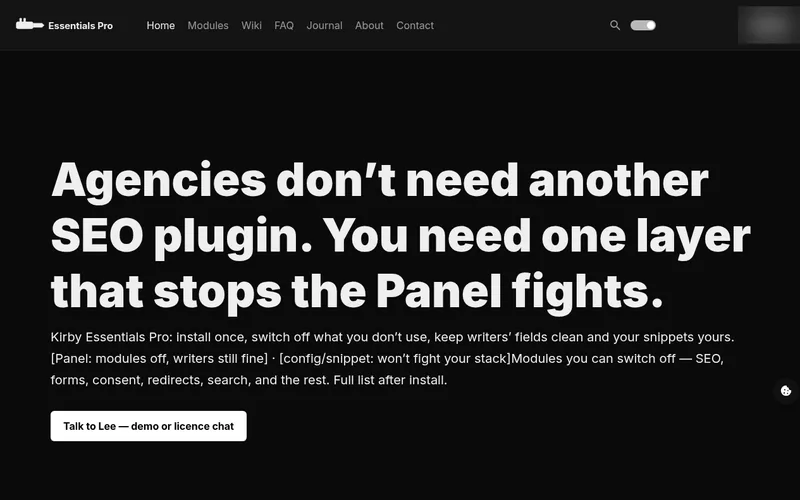
The product site sums it up: "Agencies don't need another SEO plugin. You need one layer that stops the Panel fights." Essentials Pro is that layer. The modules are designed to work together, and the Utilities module warns you when a rival SEO, form or consent plugin is installed alongside it, so clashes are spotted rather than discovered by a client.
What it does
- One plugin, one licenceSEO, speed, forms, consent and redirects in one place, instead of a stack of separate plugins.
- Switch modules on or offEvery module is a true or false in config.php. Modules that are off stay out of the way.
- A clean Panel for writersWriters only see tabs for the modules a site actually uses.
- Snippets you paste onceSEO head tags, analytics, forms, the consent banner, embeds and search.
- Consent built inStatistics wait for consent, and video and map embeds wait for marketing consent.
- Spots plugin clashesUtilities warns you if a rival SEO, form or consent plugin is installed.
How modular switching works
Modules are switched on and off in your site's config.php. Each one is a simple true or false in a modules list, next to your licence key. A module that's switched off stays out of the way, so writers keep a clean Panel.
'ljdigital-control.kirby-essentials-pro' => [
    'license' => 'EP1.…',
    'modules' => [
        'seo'       => true,
        'analytics' => true,
        'forms'     => true,
        'consent'   => true,
    ],
],
Installation follows four steps from the product documentation:
- Copy the plugin into
site/plugins/kirby-essentials-pro. - Paste in the licence key issued for the site's domain.
- Switch on only the modules this site needs.
- Add the matching tabs to
site.ymlif they aren't there already.
On the template side, you paste a few snippets in once, where you want the output: the SEO head tags, the analytics code, a form, the consent banner, consent-aware embeds and search.
<?php snippet('essentials/seo/head') ?>
<?php snippet('essentials/analytics', ['part' => 'head']) ?>
<?php snippet('essentials/consent-banner') ?>The modules
Here are all 24 modules, in the same order as the product site and written up from the product's own module guides. Open any one for what it does, its key features, how to switch it on (where the guide says) and the modules it works with.
The plugin hasn't been released yet, so treat this as the planned line-up for launch rather than a promise that every detail is final. The speed modules (Media Engine, Assets, Page Cache, Link Health and Social Cards) have shorter entries because the product's documentation says less about them so far.
SEOOnTitles, descriptions, sitemaps, schema, local, llms.txt and IndexNow.
SEO is the findability layer for every public page. It writes the title and description a person sees in Google, the picture and line a person sees in Slack or LinkedIn, the robots rules, the XML sitemap, JSON-LD for machines, local business data, a file for AI crawlers, and a health view so you can see what is still empty.
Writers work in the page SEO tab. Developers print one snippet. You should not need a second SEO plugin beside it.
Key features
- Title and description for search results.
- Share picture and line for links posted in Slack, LinkedIn and the like.
- Robots rules and canonical.
- XML sitemap and robots.txt. Listed public pages go in. Gated or noindex pages stay out.
- JSON-LD schema. Leave it on Automatic unless the page really is a product, job, event or article.
- Local business data: name, address, geo and hours, with more than one place for multi-location sites.
llms.txt, the file AI assistants look for.- IndexNow, the ping that tells supporting engines a URL changed.
- A health view that shows what is still empty.
Turn it on and set it up
- Set
'seo' => truein the plugin modules list. - Keep the SEO tabs on the page blueprint.
- Print the head once in the theme header.
<?php snippet('essentials/seo/head') ?>Related: Utilities Social Cards Assets Authors Redirects
Media EngineOnsrcset, lazy load, LCP priority, optional CDN prefix.
Media Engine is one of the five speed modules. It looks after the images on a page: srcset, lazy loading, LCP priority for the hero image, and an optional CDN prefix.
Media Engine, Assets and Page Cache cover LCP, FCP and TTFB.
Key features
- srcset.
- Lazy load.
- LCP priority for the hero image.
- Optional CDN prefix.
Turn it on and set it up
- Set
'media' => truein the plugin modules list. - Use
epPicturewith priority on the hero image.
$file->epPicture(['priority' => true])Related: Assets Page Cache Social Cards SEO
AssetsOffFont-display swap and script defer.
Assets is one of the five speed modules. It sets font-display swap and defers scripts.
The hints print with the SEO head snippet, so there is no extra snippet to paste.
Media Engine, Assets and Page Cache cover LCP, FCP and TTFB.
Key features
- Font-display swap.
- Script defer.
- Hints print with the SEO head snippet.
Turn it on and set it up
- Set
'assets' => truein the plugin modules list. - Make sure the SEO head snippet is printed in the theme header. The Assets hints print with it.
<?php snippet('essentials/seo/head') ?>Related: SEO Media Engine Page Cache
Page CacheOffGuest HTML cache. Panel users and forms are skipped.
Page Cache is one of the five speed modules. It stores the HTML that guests see for an hour, and purges it when you save.
Panel users and forms are skipped, so editors do not see stale pages. Saving a page clears the stored HTML.
Media Engine, Assets and Page Cache cover LCP, FCP and TTFB.
Key features
- Guest HTML cache, kept for an hour.
- Purged when you save a page.
- Panel users bypass the cache.
- Forms are skipped.
Turn it on and set it up
- Set
'cache' => truein the plugin modules list.
Related: Media Engine Assets Forms
Link HealthOff404 log with referrer. Feed the Redirects tab.
Link Health is one of the five speed and crawl modules. It logs 404s with the referrer, so you can see which missing URLs people are still arriving at, and from where.
It feeds the Redirects tab: add the redirect from Site → Redirects.
SEO, Link Health and Social Cards cover crawl and click-through.
Key features
- 404 log.
- Referrer recorded with each 404.
- Feeds the Redirects tab.
Turn it on and set it up
- Set
'linkhealth' => truein the plugin modules list. - Add a redirect from Site → Redirects for the URLs that still miss.
Social CardsOffGenerated 1200×630 share image when a page has none.
Social Cards is one of the five speed and crawl modules. When a page has no photograph, it generates a 1200×630 share image so the link still shows a picture when it is shared.
The image is served at
/essentials-card/{page}.svg.SEO, Link Health and Social Cards cover crawl and click-through.
Key features
- Generated 1200×630 share image.
- Only used when a page has no photograph.
- Served at
/essentials-card/{page}.svg.
Turn it on and set it up
- Set
'cards' => truein the plugin modules list.
Related: SEO Media Engine
AnalyticsOffGA4, GTM, Plausible, Fathom, Matomo, Clarity.
Analytics puts one tracker in the head from the Panel. You pick the provider the client already uses. You do not paste three snippets into the theme and hope they still match next year.
Key features
- GA4: measurement ID.
- Google Tag Manager: container ID, if the client already lives in GTM.
- Plausible and Fathom: lighter measurement.
- Matomo: when the data must stay on their host.
- Microsoft Clarity: session insight, used with care.
- Statistics scripts wait for consent when Consent is on.
- Do Not Track honoured when that toggle is on.
- Panel users and listed IPs skipped, so editors do not inflate the numbers.
Turn it on and set it up
- Set
'analytics' => truein the plugin modules list. - Site → Analytics. Choose the provider. Paste the ID.
- Print the snippet in the header. Optionally print a body part if the provider needs it.
<?php snippet('essentials/analytics', ['part' => 'head']) ?>FormsOnPanel builder, stored submissions, PHP or Kirby mail.
Forms is the Panel builder for contact and quote forms. You add fields, optional steps, a honeypot and a notify address. Submissions are stored on the Kirby site as JSON. Email is sent by your server, not by an Essentials Pro cloud.
It covers contact and quote forms. A full automation graph is still DreamForm.
Key features
- Form builder in the Panel.
- Fields, optional steps and required fields.
- Submissions stored on the site as JSON.
- Notify by PHP mail or Kirby email.
- CSRF protection plus a honeypot field.
- A snippet, or post your own theme form to the form route.
Turn it on and set it up
- Set
'forms' => truein the plugin modules list. - Site → Forms. Create a form with a stable id such as
contact. - Add name, email, message, consent. Mark required fields.
- Set a notify address that exists as a mailbox on the host.
- Print the snippet, or post a theme form to
/essentials-form/contact.
<?php snippet('essentials/form', ['id' => 'contact']) ?>Related: Mail Consent Page Cache
ConsentOnFirst-party banner. Statistics wait.
Consent is a first-party banner. Necessary cookies stay on. Statistics and marketing wait. The choice is stored in
essentials_consent. The reopen control is a cookie icon, not a wall of text.This is a banner and a script gate. It is not a law firm. Keep a privacy page you actually wrote.
Key features
- First-party banner.
- Necessary cookies always on.
- Statistics and marketing wait for a choice.
- Choice stored in
essentials_consent. - Cookie icon to reopen.
- Analytics reads the statistics flag. Embeds read the marketing flag.
Turn it on and set it up
- Set
'consent' => truein the plugin modules list. - Site → Consent. Write the short line. Link the privacy page. Turn the banner on.
- Print the snippet in the footer.
<?php snippet('essentials/consent-banner') ?>GatingOffPassword lock for templates or a page field.
Gating puts a password in front of pages. Use it for client previews, price lists and “listed but not public” URLs. Logged-in Panel users skip the lock so editors can work.
Key features
- Password lock.
- Lock a list of templates, or a single page with a page field.
- Logged-in Panel users skip the lock.
Turn it on and set it up
- Turn
gatingon in the plugin modules list. - Site → Gating. Set the password. Toggle the lock on.
- Either list templates (
post, product) or setessentialsGate: trueon the page.
essentialsGate: trueRelated: Billing Maintenance
UtilitiesOffWarns if a rival SEO, form or consent plugin is installed.
Utilities is the conflict scan. It looks at installed plugins and names the ones that will double-output a sitemap, robots file, form or banner.
What it flags
- MetaKnight.
- Kirby SEO.
- Bnomei SEO.
- Standalone robots.txt plugins.
- DreamForm.
- Other cookie-consent plugins.
Turn it on and set it up
- Open Site → Utilities after a migration.
- Remove the leftover. Two sitemaps is how pages disappear from Google.
RedirectsOffFrom/to rules plus 404 hints.
Redirects is the migration tab. From → to, 301 or 302, plus a 404 log. After a rebuild the old URLs still exist in Google. This is the work for week one, not month three.
Key features
- From → to rules.
- 301 or 302.
- 404 log with hints for URLs that still miss.
Turn it on and set it up
- Set
'redirects' => truein the plugin modules list. - Site → Redirects. Add the old path and the new path. Use 301 when the move is permanent.
- Read the 404 list after launch and add rules for the URLs that still miss.
/old-blog-post → /journal/old-blog-post 301Related: Link Health Utilities SEO
MailOnFrom address and send method used by forms.
Mail is the human-readable place for the From address and send method. Forms read it.
Your server sends the mail. Essentials Pro does not rent a mail SaaS.
Key features
- From address used by forms.
- Send method: PHP mail, or Kirby email.
Turn it on and set it up
- Site → Mail. Set the From address and the send method.
- Never commit mail passwords to version control.
Related: Forms
MaintenanceOffHolding page. Panel users and listed IPs skip it.
Maintenance shows a holding page (HTTP 503) while you rebuild. Panel users still get in. Listed IPs still get in. Visitors see the message you wrote.
Pair it with a staging host that stays noindex if the rebuild will last more than an afternoon.
Key features
- Holding page served as HTTP 503.
- Your own message.
- Panel users get in.
- Listed IPs get in.
Turn it on and set it up
- Site → Maintenance. Write the sentence.
- Add the office IP.
- Toggle the page on.
- Toggle it off before you call the site live.
EmbedsOffYouTube, Vimeo and maps wait for consent.
Embeds stops YouTube, Vimeo and similar frames from loading until marketing consent is given. The visitor sees a short note and the cookie control instead of a third-party player.
That is Consent doing real work, not only drawing a banner.
Key features
- YouTube, Vimeo and maps.
- Placeholder until marketing consent.
- A short note and the cookie control in place of the player.
Turn it on and set it up
- Turn Consent on as well. Embeds read the marketing flag.
- Print the embed snippet where the video or map should appear.
<?php snippet('essentials/embed', ['url' => $url, 'title' => 'Product film']) ?>Related: Consent
SearchOffSite search at /search plus a snippet.
Search is on-site find. No Algolia. Visitors use
/search?q=or the snippet. You can limit which templates are included so drafts and utility pages stay out.Key features
- Search at
/search?q=. - A search snippet.
- No hosted index required.
- Limit search to the templates you choose.
Turn it on and set it up
- Set
'search' => truein the plugin modules list. - Site → Search. Optionally list templates such as
default, post. - Print the snippet where the search box should appear.
<?php snippet('essentials/search') ?>- Search at
SecurityOffReferrer, nosniff, frame options, optional HSTS.
Security sends a small header pack: Referrer-Policy, X-Content-Type-Options, X-Frame-Options, Permissions-Policy. Optional HSTS when the whole site is HTTPS.
It is not a firewall and it will not stop a bad plugin. It clears the usual missing-header report so the launch checklist is shorter.
Key features
- Referrer-Policy.
- X-Content-Type-Options (nosniff).
- X-Frame-Options (same-origin frames).
- Permissions-Policy.
- Optional HSTS.
Turn it on and set it up
- Turn the module on in the plugin modules list.
- Turn HSTS on only when every host for this site already redirects to HTTPS.
Related: SEO Maintenance
FeedsOffRSS at /feed.xml.
Feeds writes RSS at
/feed.xml. Pick the templates (usuallypostor journal pages) and a limit. Some readers and some tools still subscribe this way.Key features
- RSS at
/feed.xml. - Choose the templates that go in.
- Set an item limit.
Turn it on and set it up
- Site → Feeds. Set templates and item count.
- Confirm the URL in the browser after launch.
- RSS at
AuthorsOffPeople directory and a byline helper.
Authors is a people list on the site: slug, name, role. A page points at a slug. The byline method prints it.
It is ready to hook into Person schema later through SEO.
Key features
- People directory: slug, name, role.
- Byline method for articles.
Turn it on and set it up
- Site → Authors. Add each person.
- On a page, set
authorto that person’s slug. - Print the byline in the template.
<?= $page->authorByline() ?>AccessibilityOffPlain-language pass helper for a page.
Accessibility is a quick sweep, not a formal audit. It looks for a missing title, images without alt, and descriptions too thin to make sense out of context.
It will not pass WCAG on its own. It catches the mistakes that happen every week.
Key features
- Plain-language pass helper for a page.
- Flags a missing title.
- Flags images without alt text.
- Flags thin descriptions.
Turn it on and set it up
- Turn the module on in the plugin modules list.
- Put the output in a Panel info field or a template an editor checks before publish.
<?= $page->a11yText() ?>Related: SEO
ActivityOffWho edited which page.
Activity writes who changed which page. The file is
site/logs/essentials-activity.log. Site → Activity shows the recent lines.Turn it on when more than one person edits. It will not replace a full audit log for a regulated client, but it answers “who changed the title”.
Key features
- Records who changed which page.
- Log file:
site/logs/essentials-activity.log. - Recent lines shown in Site → Activity.
Turn it on and set it up
- Turn the module on in the plugin modules list.
- Open Site → Activity to see the recent lines.
Related: Authors
BillingLaterStripe keys stored. Gating is the lock that ships today.
Billing stores Stripe keys for paid access you may switch on later. It does not take payments on its own and it does not replace a shop.
Need a lock today? Use Gating. Billing is kept for the day paid access is added.
Key features
- Stores Stripe keys for paid access you add later.
- Does not take payments on its own.
- Not a shop.
LicenceLicenceOne signed key per domain. No kill switch.
One signed key per live domain.
wwwcounts as the same site. A staging host can be added as an alias when the key is issued. The key includes twelve months of updates from the issue date: new modules, fixes, Kirby 4/5 compatibility work shipped in that year.Two websites cannot share a key. The key is signed for one domain.
Key features
- One signed key per live domain.
wwwcounts as the same site. - A staging host can be added as an alias.
- Twelve months of updates from the issue date.
- No kill switch.
Turn it on and set it up
- Paste the key in config, or in Site → Licence, or as the single line in
site/config/essentials-pro.license. - Open Site → Licence and confirm the key matches this live domain.
'ljdigital-control.kirby-essentials-pro' => [ 'license' => 'EP1.…', ],- One signed key per live domain.
Screenshots
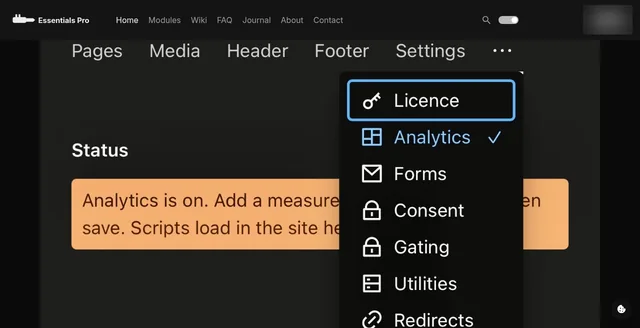
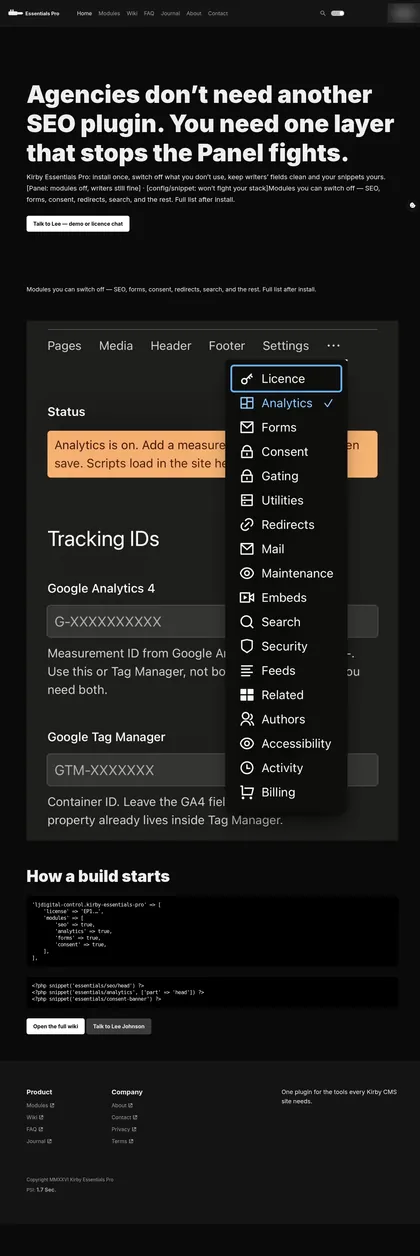
These are from the product's landing page, captured on 4 September 2026. The design has moved on in places since then.
Requirements
- Kirby4.0 or later, or 5.x. Kirby 5 is the main target.
- PHP8.1 or newer.
- Your siteAny standard Kirby site with your own templates. It's a plugin, not a theme.
- Licence keyOne per live domain.
Licensing
Essentials Pro is proprietary software, licensed per site. The terms are short and, I hope, fair to the people who build and pay for sites:
- One signed key per live domain. The www version counts as the same site, and a staging alias can be added.
- 12 months of updates come with the licence.
- No kill switch. When the year ends, the last version you have keeps running, and your site isn't forced to noindex.
- Renewal is optional, and only needed if you want new builds.
- It's yours to use, not to pass on: no sharing, reselling or getting around the domain check.
The key can be pasted into the Panel (Site, then Licence) or added in config. Pricing hasn't been set yet.
How it's built
It's a standard Kirby plugin written in PHP, configured in config.php and managed from Panel tabs, so it follows the way Kirby developers already work.
Each module stays out of the way until it's switched on. Output goes where you put the snippets, and consent is built in rather than bolted on: statistics wait for consent, and YouTube, Vimeo and map embeds wait for marketing consent.
Where it is now
In development, pre-launch. Essentials Pro hasn't been released. There's no public download or package, no checkout, and no price yet. The product site isn't ready for the public yet, so I haven't linked it here.
Before launch, the work still to do includes rebuilding the documentation, polishing the Panel tabs, setting up the product site properly, and building a checkout. Until then, Billing only stores keys for that future checkout. If you build Kirby sites and want to see where it's up to, I'm happy to show you.
FAQ
Is Kirby Essentials Pro available to buy yet?
Not yet. It's in development and hasn't been released, there's no public download, and pricing hasn't been set. If you'd like a demo or want to talk about a licence for a site you're building, get in touch.
Which versions of Kirby and PHP does it need?
Kirby 4.0 or later, or Kirby 5.x, on PHP 8.1 or newer. Kirby 5 is the main target, and Kirby 4 is supported.
Is it a theme?
No. It's a plugin, so it works with your own templates on a standard Kirby site. You add a few snippets where you want its output, and nothing else about your front end has to change.
Do I have to use every module?
No. There are 24 modules, and apart from the Licence each one can be switched on or off in config.php, and you only add Panel tabs for the modules a site uses. You can change your mind later.
Can I install it with Composer?
Not at the moment: there's no public package. Installation is a plugin folder copied into site/plugins.
What happens when the licence year ends?
Nothing switches off. There's no kill switch: the last version you have keeps running and your site isn't forced to noindex. Renewing only matters if you want new builds.
Does it take payments?
No. The Billing module only stores Stripe keys for a checkout that comes later. It doesn't charge anything today. Gating, the password lock, is the part of access control that works now.