

What it is
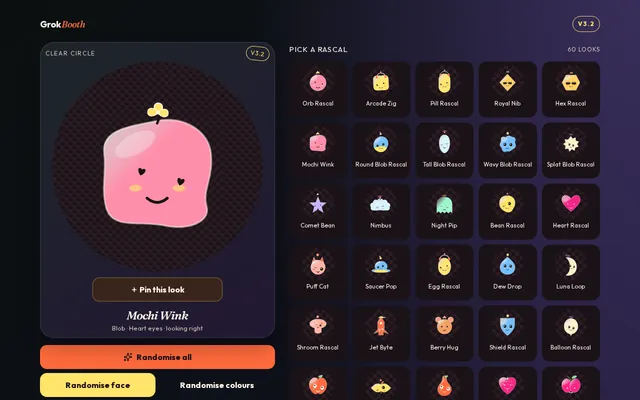
Grok Booth is a small web app for designing a cartoon face for a Grok bot. You start from one of 60 ready-made looks or build your own, then download it as a transparent, circular icon that's ready to use on iOS.
Who it's for
People who use Grok bots and want each one to have a face of its own, so it's easy to tell them apart at a glance. It's free, works in the browser and needs no account.
What it does
- 60 looksReady-made characters to start from, from Orb Rascal to Night Pip.
- Mix every partBody shape, eyes, which way they look, mouth, antenna, cheeks and face size.
- Extras and finishesAdd a bow, halo, headphones, crown or scarf, and a gloss, stripes or speckled finish.
- Your coloursPick the body and accent colours, or let it choose.
- RandomiseShuffle the colours, the face or everything at once, and pin a look you like.
- Save PNG or SVGTransparent circular icons, ready for iOS.
Why I built it
A bot is easier to recognise, and more fun to use, when it has its own face. I wanted a quick way to make a distinct, good-looking icon for a Grok bot without opening a design app, so I built one where every part of the face is a tap away.
How it's built
I built Grok Booth with v0, and it runs as a Next.js app on Vercel. The faces are drawn as vector graphics in the browser, so the SVG download stays sharp at any size, and the PNG has a clear background so it sits neatly in a circle.
Where it is now
Live, at version 3.2, which added more shapes, eyes, mouths and extras.